
Everything You Need To Know About Ios 13
Everything you need to know about iOS 13: Apple’s iOS 13 was a game-changer, bringing a ton of new features and improvements to the iPhone experience. From a sleek new Dark Mode to enhanced privacy controls and a redesigned Photos app, iOS 13 offered a fresh take on mobile computing.
But with any major update, there are always questions. What are the biggest changes? How does it affect my phone? What about my favorite apps? This guide will dive into everything you need to know about iOS 13, covering everything from its new features to its impact on your everyday use.
iOS 13 wasn’t just about aesthetics; it was about making your iPhone smarter and more secure. Apple focused on improving user experience, performance, and privacy. We’ll explore how iOS 13 changed the way you interact with your iPhone, how it boosted performance and battery life, and how it protected your personal information.
We’ll also look at how iOS 13 impacted your favorite apps and what new apps were designed specifically for the update. Whether you’re a tech enthusiast or just curious about what’s new, this guide has you covered.
Introduction to iOS 13
iOS 13 is a significant update for Apple devices, bringing a wide range of new features and improvements to enhance the user experience. It’s more than just a cosmetic refresh; it introduces fundamental changes to the operating system, making it faster, more intuitive, and more powerful than ever before.
Key Features and Improvements
iOS 13 introduces several key features and improvements across various aspects of the user experience. These enhancements are designed to streamline everyday tasks, improve performance, and enhance the overall user experience.
- Dark Mode:A system-wide dark mode that reduces eye strain and enhances readability in low-light environments. This mode inverts the colors of the interface, making it easier to use in dimly lit conditions, especially at night. Dark mode also extends battery life, as it requires less power to illuminate the screen.
- Performance Enhancements:iOS 13 features significant performance improvements, resulting in faster app launches, smoother scrolling, and a more responsive user experience overall. These improvements are achieved through optimizations in the operating system’s core components, including the file system, memory management, and graphics processing.
- New Features in Photos:iOS 13 introduces several new features to the Photos app, including enhanced editing tools, improved search capabilities, and a new video editing interface. These features provide users with more control over their photos and videos, allowing them to edit and manage their content more effectively.
- Enhanced Privacy:iOS 13 strengthens privacy protections by introducing new features that give users more control over their data and how it’s shared. These features include location tracking transparency, enhanced sign-in options, and improved privacy controls for apps.
- Improved Accessibility:iOS 13 includes several accessibility improvements, making it easier for users with disabilities to interact with their devices. These improvements include new voice control features, improved accessibility options for the camera, and enhanced support for assistive technologies.
- New Features in Maps:iOS 13 introduces several new features to the Maps app, including a more detailed 3D view of cities, improved navigation features, and a new “Look Around” feature that provides street-level views of locations.
- New Features in Reminders:iOS 13 introduces several new features to the Reminders app, including improved organization, smart suggestions, and a new list view. These features make it easier for users to manage their tasks and stay organized.
- New Features in Notes:iOS 13 introduces several new features to the Notes app, including a new gallery view, improved collaboration features, and a new “Scan Documents” feature that allows users to scan documents directly from the Notes app.
- New Features in Safari:iOS 13 introduces several new features to the Safari web browser, including a new download manager, improved website performance, and enhanced privacy protections.
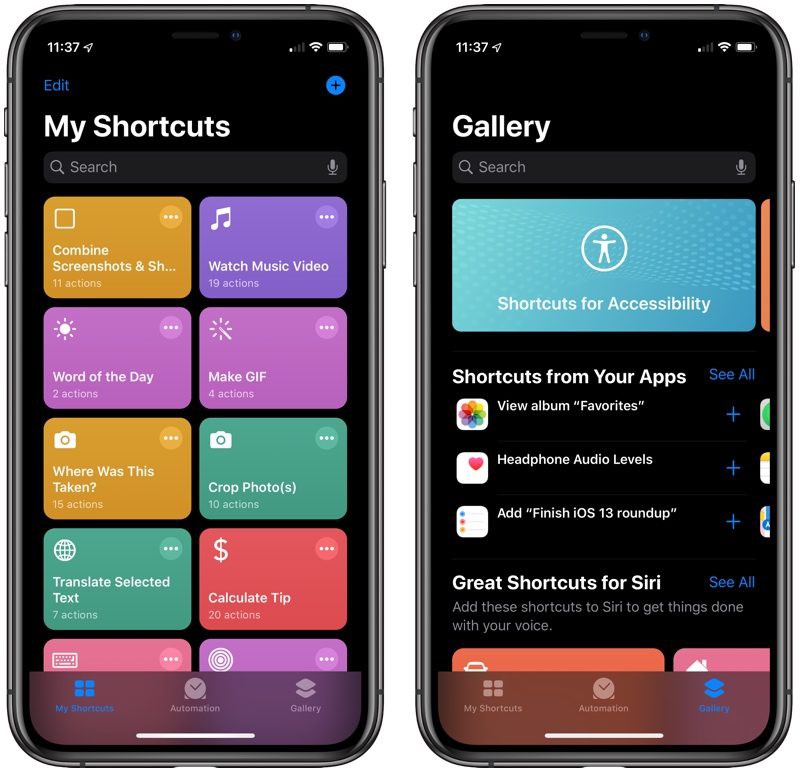
- New Features in Siri:iOS 13 introduces several new features to Siri, including improved voice recognition, enhanced voice commands, and a new “Siri Shortcuts” feature that allows users to create custom shortcuts for frequently used tasks.
Target Devices
iOS 13 is compatible with a wide range of Apple devices, including:
- iPhone 6s and later
- iPhone SE (1st and 2nd generation)
- iPad Air 2 and later
- iPad mini 4 and later
- iPad Pro (all models)
- iPod touch (7th generation)
New Features and Enhancements: Everything You Need To Know About IOS 13
iOS 13 brings a host of new features and enhancements designed to improve user experience and enhance productivity. From a redesigned Dark Mode to enhanced privacy controls, these updates aim to make your iPhone more intuitive, secure, and visually appealing.
Dark Mode
Dark Mode is a system-wide aesthetic change that replaces the traditional white background with a dark, charcoal-like color scheme. This not only gives your iPhone a sleek, modern look but also offers several practical benefits. For users who spend long hours on their devices, Dark Mode can reduce eye strain and improve readability in low-light environments.
Dark Mode is a game-changer for night owls and anyone who uses their phone in dim lighting.
iOS 13 is packed with new features, like a dark mode, improved privacy settings, and a redesigned Reminders app. But if you’re not digging the new features, you can always go back to iOS 11.4. If you’ve already installed the iOS 12 beta, you can check out How to downgrade to iOS 11.4 after installing the iOS 12 beta to see how to get back to the older operating system.
Once you’re back on iOS 11.4, you can decide whether to update to iOS 13 or stick with the older version.
The implementation of Dark Mode is not limited to just the system interface. Many apps, including popular social media platforms and productivity tools, have also embraced Dark Mode, ensuring a consistent experience across your device.
Privacy Features
iOS 13 introduces a series of privacy enhancements that give users more control over their data and online activity.
- Location Tracking:iOS 13 provides granular control over app access to your location data. You can now choose to allow apps to access your location only while using the app, or never, rather than always. This prevents apps from tracking your movements in the background without your knowledge.
- Data Sharing Controls:The “Sign in with Apple” feature offers a secure and private alternative to using social media accounts for app logins. It also limits the amount of personal data that apps can access, enhancing your online privacy.
These new privacy features empower users to make informed decisions about their data and ensure that their online activity is not being tracked without their consent.
Photos App Improvements
The Photos app in iOS 13 has been significantly improved with new editing tools and organization features.
iOS 13 brought a ton of cool new features, like dark mode and improved privacy settings. But did you know it also enhanced the Apple Watch experience? You can now track even more workouts and get better insights into your fitness progress with the new Apple Watch Workout app.
Check out Discover the secrets of the Apple Watch Workout app to learn how to make the most of it. Once you’ve mastered the Apple Watch, you’ll be able to fully embrace all the awesome features iOS 13 has to offer.
- Enhanced Editing Tools:iOS 13 introduces powerful new editing tools, including advanced color controls, selective adjustments, and the ability to apply filters to specific areas of a photo. These tools give users greater control over their images and allow them to create professional-looking results.
- Improved Organization:The Photos app now offers improved organization features, including a new “People” album that automatically groups photos based on the people in them. This makes it easier to find specific photos, especially those featuring family and friends.
The improved Photos app in iOS 13 makes it easier to edit, organize, and share your photos.
User Interface and Experience
iOS 13 brought a noticeable refresh to the user interface, with a focus on refining the existing design language and introducing new navigation features. While the overall aesthetic remained consistent with previous iOS versions, several key changes made the experience smoother and more intuitive.
Changes in Design and Layout
The visual overhaul in iOS 13 was subtle but impactful. The icons, fonts, and color palette were refined to create a more modern and polished look. The system font, San Francisco, was updated with a new bold weight, adding a touch of visual interest to text elements.
- The Dark Modeintroduced in iOS 13 significantly altered the appearance of the user interface. By inverting the color scheme, it provided a darker, more visually comfortable experience, especially in low-light conditions. Dark Mode extended to system apps, third-party apps, and even the lock screen.
- The Home Screenreceived a minor redesign. The icons were slightly enlarged and given more breathing room, making them easier to tap. The app icons were also given a subtle gradient effect, adding depth and dimension to the home screen.
- The Notification Centerwas revamped to improve organization and clarity. Notifications were grouped by app, and the design was streamlined to reduce visual clutter. The new notification design provided more context and made it easier to manage notifications.
New Swipe Gestures and Navigation Methods
iOS 13 introduced new swipe gestures and navigation methods to enhance user interaction and streamline workflows.
- The Swipe-to-typefeature in the keyboard allowed users to swipe their finger across the keyboard to input text, making typing faster and more efficient.
- The Swipe-to-deletegesture was extended to more apps and actions, allowing users to quickly remove items from lists or delete content. This gesture was particularly useful for clearing notifications and managing email.
- The Swipe-to-editgesture was introduced in several apps, allowing users to quickly modify text or other content without having to tap an edit button. This streamlined the editing process and made it more intuitive.
Accessibility Features and Improvements
iOS 13 introduced a number of accessibility features and improvements designed to make the operating system more accessible to users with disabilities.
- The Voice Controlfeature allowed users to control their iOS devices entirely using their voice. This was a significant advancement for users with motor impairments, allowing them to interact with their devices without having to use their hands.
- The Dynamic Typefeature provided a wider range of font sizes, making it easier for users with visual impairments to adjust the text size to their preference.
- The AssistiveTouchfeature allowed users to create custom gestures and actions using the display, providing a more accessible way to interact with their devices.
Performance and Battery Life
Apple has always prioritized performance and battery life in its iOS updates, and iOS 13 is no exception. The update brings a range of improvements and optimizations aimed at enhancing the overall user experience.
Performance Improvements
Apple has focused on optimizing iOS 13 for better performance across various aspects of the device. This includes smoother app launches, faster multitasking, and improved responsiveness.
- Optimized App Launch Times:iOS 13 introduces optimizations that make apps launch faster than before. This is achieved through improved app pre-loading and background processes, allowing apps to be ready for use almost instantly.
- Enhanced Multitasking:The update includes enhancements to multitasking, making it smoother and more efficient. This allows users to switch between apps seamlessly and quickly, without experiencing lag or delays.
- Improved Responsiveness:iOS 13 improves overall responsiveness by optimizing system processes and reducing resource consumption. This results in a faster and more fluid user experience across the device.
Battery Life
While performance improvements are crucial, iOS 13 also focuses on extending battery life. The update incorporates new battery management features and optimizations to ensure that devices can run longer on a single charge.
- Low Power Mode:iOS 13 enhances the existing Low Power Mode, further reducing power consumption when the battery is low. This allows users to extend their battery life even further when they need it most.
- Background App Activity Optimization:iOS 13 optimizes background app activity to reduce unnecessary power consumption. This ensures that apps only use battery when necessary, maximizing battery life.
- Adaptive Battery Management:iOS 13 utilizes machine learning to predict user behavior and optimize battery usage accordingly. This adaptive approach ensures that battery power is used efficiently, extending battery life without compromising performance.
Known Performance Issues
While iOS 13 offers significant performance improvements, some users have reported encountering performance issues or bugs. These issues are often specific to certain devices or apps and are usually addressed through subsequent updates.
- App Crashes:Some users have reported experiencing app crashes, particularly with older apps that haven’t been updated for iOS 13 compatibility. These crashes are often resolved through app updates.
- Battery Drain:Some users have reported excessive battery drain, particularly with certain apps or features. This issue is often related to specific app configurations or background processes and can be resolved through app updates or by disabling unnecessary features.
- Performance Lag:A small number of users have reported experiencing performance lag, particularly on older devices. This issue is usually addressed through subsequent iOS updates, which further optimize the operating system for older devices.
App Updates and Compatibility
iOS 13 brings a host of updates to existing apps and introduces new ones. These changes not only enhance user experience but also showcase Apple’s commitment to a robust app ecosystem. It’s important to understand how these updates affect popular apps and their compatibility with the new operating system.
App Updates and Changes
With iOS 13, Apple has implemented several updates and changes to its core apps. These updates are aimed at improving functionality, user interface, and overall user experience.
- Safari:The web browser has received a significant overhaul, introducing a new download manager, enhanced privacy controls, and improved performance. It now also supports a dark mode, which helps reduce eye strain in low-light conditions.
- Photos:The Photos app has been redesigned to provide a more intuitive user experience. It features a new “People” tab that automatically organizes photos by faces, making it easier to find specific individuals. The “Videos” tab has also been redesigned, with a focus on enhanced editing capabilities and improved video playback.
- Mail:The Mail app has been enhanced with a new “Block Sender” feature, allowing users to easily block unwanted emails. The app also features improved search capabilities and a redesigned interface for a cleaner look.
- Reminders:The Reminders app has received a major update, with a new user interface, smarter suggestions, and the ability to create lists with multiple locations and due dates. Users can now easily customize reminders with icons, colors, and more.
- Notes:The Notes app now supports folder sharing, allowing users to collaborate on notes with others. The app also features improved search capabilities and a new “Gallery View” that provides a more visually appealing way to view notes.
App Compatibility, Everything you need to know about iOS 13
Most popular apps are compatible with iOS 13. However, some apps may require updates to fully utilize the new features and functionality of the operating system.
- Compatibility Issues:Some apps may experience minor compatibility issues or bugs in the initial release of iOS 13. These issues are usually resolved quickly by developers through app updates. It’s always a good idea to check for updates to ensure that your apps are running smoothly.
- App Store:The App Store provides information about app compatibility with iOS 13. Before downloading or updating an app, it’s recommended to check the App Store description for compatibility details.
New Apps for iOS 13
iOS 13 introduces several new apps specifically designed for the operating system. These apps enhance the functionality and user experience of the device.
- Arcade:Apple Arcade is a subscription-based gaming service that provides access to a library of exclusive and high-quality games. It offers a curated selection of games, with new titles added regularly. Users can download and play games offline, and there are no in-app purchases or advertisements.
- TV+:Apple TV+ is a streaming service that offers original TV shows and movies. It features a curated selection of content, with new releases added regularly. Users can download and watch content offline, and there are no advertisements.
Security and Privacy
Apple has always prioritized user privacy and security in its products, and iOS 13 takes these principles to the next level. The operating system introduces a suite of new features and enhancements that aim to safeguard user data and protect against potential threats.
Enhanced Security Measures
iOS 13 implements a variety of security measures to protect user data and devices from unauthorized access and malicious attacks.
- Sign in with Apple:This feature allows users to sign into apps and websites using their Apple ID, eliminating the need to create separate accounts and share personal information with third-party services. This simplifies the login process while enhancing privacy, as Apple does not track user activity or share data with developers.
- Improved Security for Passwords:iOS 13 introduces a more robust password manager that uses advanced encryption techniques to protect user credentials. The operating system also provides warnings for weak or compromised passwords, encouraging users to adopt stronger security practices.
- Enhanced Data Protection:iOS 13 strengthens data protection by encrypting more data at rest and in transit, making it more difficult for unauthorized parties to access sensitive information. The operating system also limits access to user data by apps, requiring explicit user consent for specific permissions.
- Secure Enclave:This dedicated processor within the iPhone and iPad securely stores sensitive data, such as fingerprint and facial recognition data, making it inaccessible to malicious software or unauthorized access.
New Privacy Settings and Controls
iOS 13 offers expanded privacy controls, giving users more granular control over how their data is collected, used, and shared.
- Location Services:Users can now choose to grant apps access to their location only when the app is in use, rather than always. This helps to reduce the amount of location data that apps collect, protecting user privacy.
- Bluetooth Tracking:iOS 13 introduces a feature that prevents apps from tracking user location using Bluetooth signals, further enhancing privacy and security.
- App Tracking Transparency:This feature requires apps to obtain explicit user consent before tracking their activity across other apps and websites. Users can choose to opt out of tracking, limiting the amount of data that apps collect for targeted advertising.
- Privacy Dashboard:iOS 13 provides a central location where users can view and manage their privacy settings, including access to location data, contacts, photos, and more. This dashboard empowers users to make informed decisions about their privacy.
Impact on Data Security and User Privacy
iOS 13 significantly enhances data security and user privacy by implementing robust security measures and providing users with greater control over their data. The new privacy features, such as Sign in with Apple and App Tracking Transparency, help to reduce the amount of personal information that users share with third-party services and limit the ability of apps to track user activity.
This creates a more secure and private environment for users, giving them greater control over their digital lives.
Installation and Upgrade Process
Upgrading to iOS 13 is a straightforward process, but it’s important to understand the steps involved and potential risks to ensure a smooth transition.
Prerequisites and Preparation
Before you begin the upgrade process, there are a few essential things to consider:
- Back Up Your Device:It’s crucial to back up your iPhone or iPad before upgrading to iOS 13. This will ensure that your data, settings, and apps are preserved in case something goes wrong during the upgrade. You can use iCloud, iTunes, or a third-party backup service for this purpose.
- Check Compatibility:Not all devices are compatible with iOS 13. Ensure your device is supported by checking the official Apple website or the Settings app on your device.
- Free Up Storage Space:The iOS 13 update may require significant storage space. Free up some space on your device by deleting unnecessary files, apps, or photos.
- Connect to a Reliable Wi-Fi Network:The update download can be large, so it’s recommended to connect to a stable Wi-Fi network for a faster and more reliable download.
Upgrade Process
Here’s a step-by-step guide on how to upgrade to iOS 13:
- Open the Settings App:On your iPhone or iPad, open the Settings app.
- Select General:In the Settings app, tap on “General.”
- Tap on Software Update:Within the General section, tap on “Software Update.”
- Download and Install:Your device will check for available updates. If iOS 13 is available, tap on “Download and Install.”
- Enter Your Passcode:You may be prompted to enter your passcode for authentication.
- Agree to Terms and Conditions:Read and agree to the terms and conditions of the update.
- Wait for Installation:The update will download and install. This may take some time depending on your internet connection and device storage.
- Restart Your Device:Once the update is complete, your device will restart.
Potential Risks and Challenges
While the upgrade process is generally smooth, there are some potential risks and challenges you should be aware of:
- Data Loss:Although backing up your device is recommended, there is always a slight risk of data loss during the upgrade process.
- Compatibility Issues:Some apps may not be compatible with iOS 13, resulting in crashes or malfunctions.
- Performance Issues:Older devices may experience performance issues or slower speeds after upgrading to iOS 13.
- Battery Life:Some users have reported battery life issues after upgrading to iOS 13.
Tips for a Smooth Upgrade
Here are some tips for ensuring a smooth upgrade process:
- Charge Your Device:Ensure your device is fully charged before starting the upgrade process.
- Connect to a Reliable Wi-Fi Network:A strong and stable Wi-Fi connection is crucial for a faster and more reliable download.
- Be Patient:The upgrade process can take some time, so be patient and avoid interrupting the process.
- Restart Your Device:After the upgrade is complete, restart your device to ensure all changes are applied correctly.
iOS 13 for Different Devices
iOS 13 offers a range of features and performance improvements across various Apple devices. However, the specific experience may vary depending on the device model and its capabilities. This section explores the performance and features of iOS 13 on different Apple devices, including iPhones, iPads, and iPod touches, and highlights any device-specific features or limitations.
iPhone Performance and Features
The performance of iOS 13 on iPhones is generally excellent, with noticeable improvements in speed and responsiveness. iPhones with A11 Bionic chips or newer experience the most significant benefits. iOS 13 introduces new features specifically designed for iPhones, such as:
- Dark Mode:A system-wide dark mode that enhances readability in low-light conditions and reduces eye strain. This feature is available on all iPhones running iOS 13.
- New Camera Features:Enhanced portrait mode with adjustable lighting effects, a new “Deep Fusion” image processing technology for improved image quality, and a redesigned camera interface.
- Improved Siri:Enhanced voice recognition, faster response times, and the ability to make and receive calls with Siri.
- Sign In with Apple:A new privacy-focused login option that allows users to sign into apps and websites without sharing personal data.
- Memoji Stickers:Customizable Memoji characters that can be used as stickers in messages and other apps.
iPad Performance and Features
iOS 13 also brings significant enhancements to iPads. iPads with A10 Fusion chips or newer experience notable performance improvements. iOS 13 introduces several new features specifically designed for iPads, including:
- iPadOS:A new operating system specifically tailored for iPads, featuring a redesigned home screen, enhanced multitasking capabilities, and a new file management system. iPadOS is a separate operating system from iOS and is available on iPads with A9 chips or newer.
- Desktop-Class Browsing:Safari on iPadOS now offers a desktop-class browsing experience, allowing users to access websites designed for desktop computers.
- Multitasking Enhancements:Improved multitasking capabilities, including the ability to use multiple windows of the same app simultaneously.
- Apple Pencil Improvements:Enhanced Apple Pencil support, including new gestures and lower latency.
iPod Touch Performance and Features
The 7th generation iPod touch, released in 2019, is the only iPod touch model that supports iOS While iOS 13 introduces several new features for iPhones and iPads, the iPod touch receives a limited set of updates. Some notable features include:
- Performance Improvements:iOS 13 brings performance improvements to the iPod touch, including faster app launch times and smoother scrolling.
- New Game Controller Support:The iPod touch now supports the latest PlayStation DualShock 4 and Xbox Wireless controllers, enhancing gaming experiences.
- Updated App Store:The App Store on the iPod touch receives a visual refresh and improved app discovery features.
Device-Specific Features and Limitations
While iOS 13 offers a consistent experience across different Apple devices, there are some device-specific features and limitations. For example:
- iPadOS:iPadOS is a separate operating system from iOS and is only available on iPads with A9 chips or newer.
- Deep Fusion:Deep Fusion is a new image processing technology available on iPhones with A13 Bionic chips.
- Apple Pencil Support:Apple Pencil support is only available on select iPad models.
Optimizing iOS 13 for Different Devices
To optimize iOS 13 for specific devices, consider the following recommendations:
- Update to the Latest iOS Version:Ensure your device is running the latest version of iOS 13 for the best performance and security updates.
- Clear Unused Apps and Data:Free up storage space by deleting unused apps and data to improve performance.
- Disable Unnecessary Background Processes:Reduce battery consumption and improve performance by disabling background processes for apps you rarely use.
- Adjust Display Settings:Consider adjusting display settings, such as brightness and resolution, to optimize battery life.
- Use iCloud:Utilize iCloud to store photos, documents, and other data in the cloud, freeing up storage space on your device.
The Future of iOS
The future of iOS is brimming with exciting possibilities, driven by ongoing advancements in technology and Apple’s commitment to innovation. As we look ahead, we can expect a continuous evolution of iOS, incorporating cutting-edge features and enhancing the user experience in remarkable ways.
Emerging Technologies and Trends
The future of iOS will be significantly influenced by emerging technologies and trends.
- Artificial Intelligence (AI) and Machine Learning (ML):AI and ML will play a pivotal role in shaping the future of iOS, enhancing personalization, automation, and user experience. Imagine a future where iOS anticipates your needs, proactively suggests relevant content, and automates tasks based on your preferences.
iOS 13 was a game-changer, introducing features like Dark Mode and a revamped Photos app. But did you know it also laid the groundwork for a password-free future? Check out How to join the awesome password-free future and use passkeys to learn how to ditch those annoying passwords and use passkeys for a more secure experience.
Once you’ve got that down, you’ll be able to truly explore all the awesome features iOS 13 has to offer!
AI-powered assistants like Siri will become more sophisticated, offering personalized recommendations and streamlining everyday tasks. Apple’s focus on privacy-focused AI development ensures user data remains protected while harnessing the power of AI for a seamless and intuitive experience.
- Augmented Reality (AR) and Virtual Reality (VR):AR and VR technologies are poised to revolutionize how we interact with the digital world. iOS is expected to integrate AR and VR capabilities seamlessly, creating immersive experiences for gaming, education, and entertainment. Imagine using your iPhone to visualize furniture in your living room before purchasing or exploring historical sites through immersive AR tours.
Apple’s commitment to AR development, as seen in the introduction of ARKit, indicates a future where AR is an integral part of the iOS ecosystem.
- Internet of Things (IoT):The growing interconnectedness of devices through the IoT will have a profound impact on iOS. iOS will become a central hub for managing and controlling smart home devices, wearables, and other connected devices. This integration will enable seamless control of your home environment, personalized health tracking, and enhanced productivity.
Apple’s HomeKit platform already provides a robust foundation for managing smart home devices, and we can expect this integration to become even more robust in the future.
Conclusion
iOS 13 is a significant update for Apple’s mobile operating system, bringing a wide range of new features, enhancements, and improvements across various aspects of the user experience. From a redesigned interface and enhanced performance to improved privacy features and new app capabilities, iOS 13 offers a compelling upgrade for iPhone users.
Key Takeaways
iOS 13 represents a substantial evolution for the iPhone experience, introducing a multitude of features and refinements that enhance user productivity, personalization, and overall usability. Here are some of the key takeaways:
- Redesigned Dark Mode:A system-wide dark mode option enhances readability, reduces eye strain, and provides a visually appealing alternative to the traditional light mode.
- Enhanced Performance and Battery Life:Optimizations in iOS 13 lead to improved app launch times, smoother multitasking, and extended battery life, contributing to a more efficient and enjoyable user experience.
- New Features and Enhancements:iOS 13 introduces a variety of new features, including a revamped Photos app with advanced editing tools, a more intuitive Reminders app, and a redesigned Maps app with improved navigation and street view.
- Enhanced Security and Privacy:Apple continues to prioritize user privacy with new features in iOS 13, such as Sign in with Apple, which allows users to log into apps and websites without sharing personal information, and improved location tracking controls.
- Improved App Compatibility:The App Store now features a dedicated section for apps optimized for iOS 13, ensuring a seamless and efficient experience for users.
Closing Summary
So, there you have it. iOS 13 was a significant step forward for Apple’s mobile operating system, offering a range of new features, performance enhancements, and privacy improvements. Whether you’re upgrading from an older iOS version or just exploring the latest tech, iOS 13 brought a lot to the table.
As we move forward, it’s clear that Apple continues to prioritize user experience, security, and innovation, and iOS 13 is a testament to that commitment. Now that you’re equipped with a deeper understanding of iOS 13, you can confidently navigate its features and make the most of your iPhone experience.
FAQ Explained
Is iOS 13 still supported?
Apple has officially ended support for iOS 13. To access the latest features and security updates, you’ll need to upgrade to a newer version of iOS.
What are the best features of iOS 13?
Many people loved the Dark Mode, the new privacy controls, and the improved Photos app. It really depended on your personal needs and preferences.
Does iOS 13 work on all iPhones?
No, iOS 13 has compatibility requirements. You can check Apple’s website to see which iPhone models are supported.
 Hubungi Kami di WhatsApp