
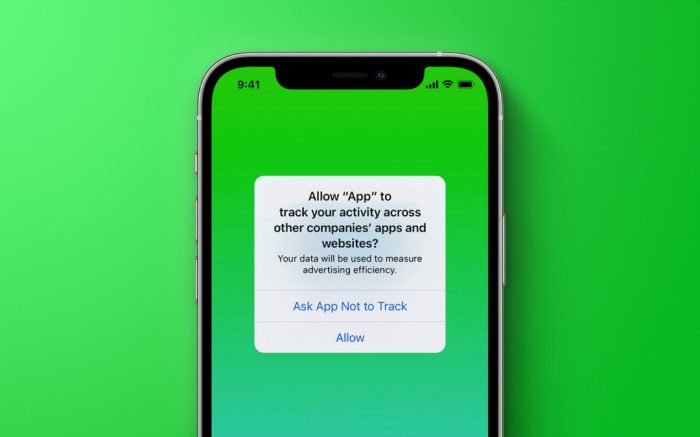
How To Stop Apps From Tracking You In Ios 14.5
How to stop apps from tracking you in iOS 14.5 is a question that’s on everyone’s mind these days. With all the data being collected about us, it’s more important than ever to take control of our privacy. iOS 14.5 brought some awesome new features that give us more control over how our data is used.
This article will walk you through the steps you need to take to keep your information safe and secure.
In this digital age, our online activity is constantly being tracked. Apps collect data about our location, browsing history, contacts, and more. While some of this data collection might seem harmless, it can have serious consequences. From targeted advertising to identity theft, the risks associated with app tracking are real.
But don’t worry, iOS 14.5 has given us some powerful tools to fight back.
iOS 14.5 and Your Privacy
iOS 14.5, released in April 2021, brought significant privacy enhancements for iPhone and iPad users. One of the most notable features is the ability to control how apps track your activity across different apps and websites. This update empowers users to take control of their data and make informed decisions about their online privacy.Understanding app tracking is crucial because it can reveal sensitive information about your interests, browsing habits, and location.
This data can be used by companies to target you with personalized ads, create detailed profiles about your behavior, and even sell your information to third parties.
Understanding App Tracking
App tracking is the process by which apps collect and share your data with other companies, often without your knowledge or consent. This data can include:
- Your browsing history
- Your location
- Your search queries
- Your app usage
- Your contacts
This data is valuable to companies because it allows them to target you with more relevant advertising and personalize their services. However, it also raises privacy concerns because it can be used to track your online activity, build detailed profiles about your interests, and even sell your information to third parties.
How iOS 14.5 Protects Your Privacy
iOS 14.5 introduces a new feature called App Tracking Transparency (ATT), which requires apps to ask for your permission before tracking your activity across other apps and websites. This gives you more control over your data and allows you to decide whether or not you want to be tracked.
“The user has the right to know what data is being collected and how it is being used. This is the foundation of a privacy-focused future.”
This feature is important because it helps to protect your privacy by giving you more control over your data. It also makes it more difficult for companies to track your activity without your knowledge or consent.
How to Stop Apps from Tracking You in iOS 14.5
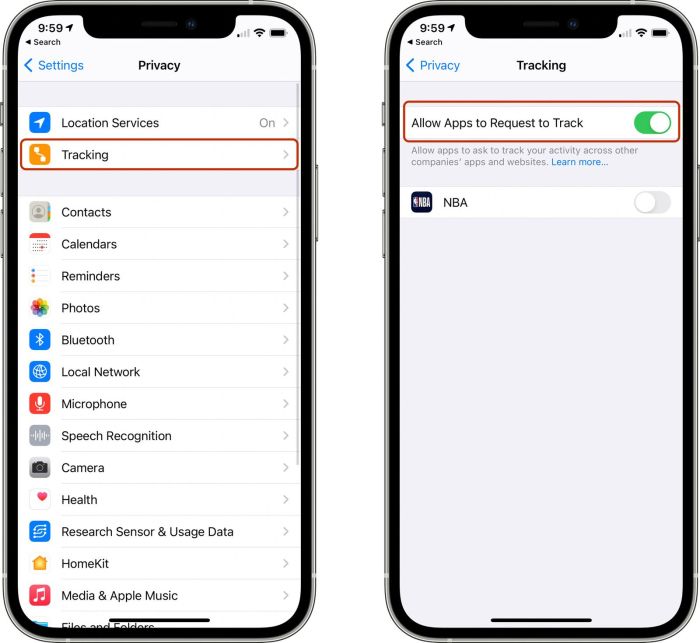
To stop apps from tracking you in iOS 14.5, you can follow these steps:
- Open the Settings app on your iPhone or iPad.
- Tap on Privacy.
- Tap on Tracking.
- Toggle the switch next to “Allow Apps to Request to Track” to the off position.
Once you have disabled app tracking, apps will no longer be able to collect and share your data with other companies. However, it is important to note that some apps may not function properly if they are not able to track your activity.
Understanding App Tracking
App tracking is a common practice in the digital world. It’s how apps gather information about you and your activities, often without your explicit knowledge or consent. This information is used to tailor your experience, deliver targeted ads, and improve app functionality.
While it can seem harmless, understanding how app tracking works and the potential consequences is crucial to protecting your privacy.
Data Collection Methods
Apps employ various techniques to track your data. Some common methods include:
- Tracking Pixels:These are tiny images embedded in websites and emails that send information back to the app when you visit a page or open an email. This information can include your IP address, device type, and other details.
- Cookies:Cookies are small files stored on your device that allow websites to remember your preferences and track your browsing activity. Apps can use cookies to collect information about your browsing history, interests, and other data points.
- SDKs (Software Development Kits):These are pieces of code that developers integrate into their apps to access data from your device and other apps. SDKs can be used to collect information about your location, contacts, and other sensitive data.
- Fingerprinting:This technique involves collecting unique identifiers about your device, such as its operating system, browser version, and other hardware characteristics. This information can be used to create a unique fingerprint that allows apps to track you across different devices and platforms.
Types of Data Collected
Apps collect a wide range of data, including:
- Location Data:This includes your physical location, travel patterns, and places you frequent. Apps can use this information to personalize your experience, provide location-based services, and target ads based on your location.
- Browsing History:This data includes the websites you visit, the searches you perform, and the content you interact with. Apps can use this information to track your interests, target ads based on your browsing behavior, and personalize your content recommendations.
- Contacts:Apps can access your contact list, including names, phone numbers, and email addresses. This information can be used to create a profile of your social network and target ads based on your connections.
- Purchases:Apps can track your in-app purchases, online shopping history, and other spending patterns. This information can be used to target ads for products and services you might be interested in.
- Device Information:Apps can collect information about your device, such as its model, operating system, and hardware specifications. This information can be used to track your device usage, target ads based on your device type, and identify potential security vulnerabilities.
Potential Consequences of App Tracking
The consequences of app tracking can be significant and include:
- Targeted Advertising:App tracking enables companies to target you with ads based on your personal information, interests, and browsing history. This can lead to intrusive and irrelevant ads that can be frustrating and annoying.
- Privacy Violations:The collection of sensitive data, such as your location, contacts, and browsing history, can raise privacy concerns. This information could be used to create detailed profiles of your behavior and interests, which could be exploited for malicious purposes.
- Data Breaches:If the data collected by apps is not properly secured, it could be vulnerable to data breaches. This could result in the exposure of your personal information to unauthorized individuals, which could lead to identity theft, fraud, and other security risks.
If you’re trying to be more mindful of your privacy, you can stop apps from tracking you in iOS 14.5. It’s easy to do and can give you more control over your data. But, if you’re looking for a way to wind down at night, you might want to check out How to create a sleep playlist for your HomePod.
A relaxing playlist can help you fall asleep faster and get a better night’s rest. And if you’re worried about your sleep data being tracked, you can always choose to use a different music app.
- Manipulation and Bias:App tracking can be used to manipulate user behavior and influence decisions. For example, apps could use your location data to track your movements and target you with ads based on your real-time location.
- Discrimination:App tracking can contribute to discrimination based on factors such as race, gender, and socioeconomic status. For example, companies could use your location data to target you with ads based on your neighborhood, which could lead to discriminatory practices.
Enabling App Tracking Transparency
Okay, so you’ve got your iOS 14.5 device all set up, and you’re ready to take control of your privacy. The next step is to enable App Tracking Transparency. This feature gives you the power to decide which apps can track your activity across other apps and websites.
It’s like having a personal bodyguard for your online life!
Accessing App Tracking Transparency Settings
To access these settings, open the Settingsapp on your iPhone or iPad. Then, scroll down and tap on Privacy. You’ll find the Trackingoption.
Understanding “Ask App Not to Track”
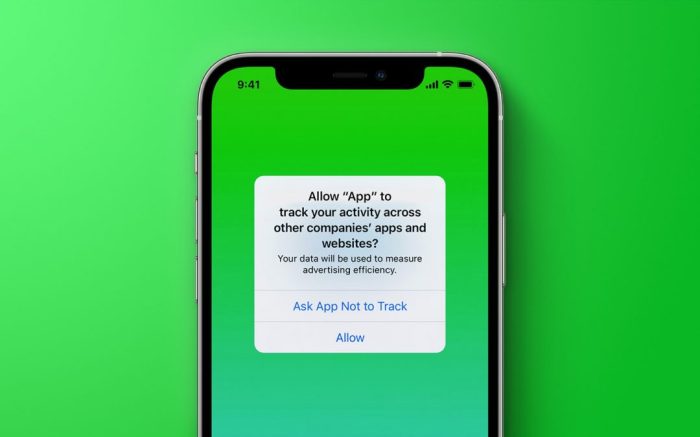
The “Ask App Not to Track” option is like a magic switch that lets you control app tracking. When enabled, apps will have to ask your permission before tracking your activity. This means you’ll get a pop-up notification every time an app wants to track you.
This gives you the power to decide whether to allow it or not.
Granting or Denying App Tracking Requests
When an app requests to track you, you’ll see a pop-up notification with two options: “Allow” or “Ask App Not to Track”. If you choose “Allow”, the app will be able to track your activity across other apps and websites.
However, if you choose “Ask App Not to Track”, the app will not be able to track your activity.
Limiting App Tracking
In iOS 14.5, Apple has introduced a powerful set of tools that allow you to limit how apps track your activity. This helps you maintain your privacy and control how your data is used. Let’s explore these tools.
You know how to stop those apps from tracking you in iOS 14.5, right? It’s pretty easy. But what if you want to make sure your privacy settings are up to snuff for your Mac too? If you’re dealing with a bunch of images, you might want to resize them before sharing them online.
Check out this guide on How to resize images using Apple’s Preview tool in macOS and you’ll be set. Then, you can relax knowing that your data is secure and your images are the perfect size for sharing.
Using the “Limit Ad Tracking” Setting, How to stop apps from tracking you in iOS 14.5
The “Limit Ad Tracking” setting in iOS 14.5 prevents apps from using your data for targeted advertising. This setting is separate from App Tracking Transparency, which focuses on tracking for any purpose, not just advertising.
To access this setting, go to your iPhone’s “Settings” app, then tap “Privacy” and then “Tracking.” Toggle the switch for “Limit Ad Tracking” to the “on” position.
This setting will prevent apps from using your unique advertising identifier (IDFA) for targeted advertising. Your IDFA is a unique code that apps can use to track your activity across different apps and websites. By limiting ad tracking, you’re making it harder for apps to build detailed profiles of your interests and habits.
Using Privacy-Focused Browsers and Search Engines
Using privacy-focused browsers and search engines is another effective way to limit app tracking. These browsers and search engines are designed to minimize data collection and tracking.
Examples of privacy-focused browsers include Brave, Firefox, and DuckDuckGo. These browsers offer features like built-in ad blocking, enhanced privacy settings, and data encryption.
Examples of privacy-focused search engines include DuckDuckGo and StartPage. These search engines do not track your searches or store your personal information.
By using these privacy-focused browsers and search engines, you can significantly reduce the amount of data that apps and websites can collect about your online activity.
Managing App Permissions
You’ve taken control of app tracking, but that’s just the beginning. Your iOS device is packed with data that apps can access, from your location to your microphone. To truly safeguard your privacy, you need to manage these permissions carefully.
iOS gives you granular control over what data each app can access. You can decide whether an app can use your location, camera, microphone, contacts, photos, and more. This level of control ensures that only apps you trust have access to your sensitive information.
Revoking App Permissions
Revoking app permissions is a straightforward process. Here’s how you can do it:
- Open the Settingsapp on your iPhone or iPad.
- Scroll down and tap on Privacy.
- Select the type of data you want to manage, such as Location, Camera, or Microphone.
- You’ll see a list of apps that have requested access to this data. Tap on the app you want to manage permissions for.
- You can then choose to Allow Always, Allow While Using App, Ask Next Time, or Never.
For example, if you don’t want an app to access your location all the time, you can choose Allow While Using Appto limit its access to when you’re actively using the app. If you don’t want an app to use your microphone at all, you can choose Never.
Regularly Reviewing App Permissions
It’s a good idea to regularly review the permissions you’ve granted to apps. You can do this by going to the Privacysection in the Settingsapp. Here’s why this is important:
- You might have granted permissions to apps you no longer use.If you’ve deleted an app or no longer use it regularly, you might want to revoke its permissions to protect your privacy.
- Apps might update and request new permissions.Apps can request access to more data after they’ve been updated. It’s important to review these requests and decide whether you want to grant them.
- You might have granted permissions without fully understanding the implications.Sometimes we grant permissions to apps without thinking about what data we’re sharing. Regularly reviewing your permissions can help you make informed decisions about your privacy.
Using Privacy-Focused Apps
You can take your privacy a step further by using apps specifically designed with privacy in mind. These apps are built to collect less data and provide more control over your information. These apps often use techniques like end-to-end encryption, which means only you and the recipient can read your messages.
They might also avoid tracking your location or using advertising networks.
Privacy-Focused App Examples
Many privacy-focused apps are available, offering alternatives to traditional apps. Here are a few examples:
- Messaging:Signal, Telegram, and Wickr offer secure and encrypted messaging. These apps prioritize user privacy and minimize data collection. Signal, for example, uses end-to-end encryption, so only you and the recipient can read your messages.
- Browsers:Brave, DuckDuckGo, and Firefox Focus are known for their privacy-focused features. Brave, for example, blocks ads and trackers by default, while DuckDuckGo focuses on search privacy and doesn’t track your searches.
- Email:ProtonMail and Tutanota are email providers that prioritize privacy. ProtonMail uses end-to-end encryption for emails, while Tutanota offers secure storage and encryption.
- Social Media:Diaspora and Mastodon are decentralized social networks that prioritize user privacy. These platforms don’t collect as much data as traditional social media platforms and give users more control over their information.
Differences from Traditional Apps
Privacy-focused apps differ from traditional apps in how they collect and use data. Here are some key differences:
- Data Collection:Privacy-focused apps collect less data than traditional apps. They might only collect essential data for the app’s functionality, while traditional apps often collect extensive data for advertising and other purposes.
- Data Usage:Privacy-focused apps use the data they collect primarily for their core functionality. They avoid using data for targeted advertising or selling it to third parties.
- Transparency:Privacy-focused apps are typically more transparent about their data practices. They clearly explain what data they collect, how they use it, and how users can control their data.
Additional Privacy Tips
While iOS 14.5 offers powerful privacy features, it’s important to remember that these features are just part of a larger picture. You can take further steps to enhance your online privacy and security beyond just managing app tracking.
Using a Strong Passcode and Enabling Two-Factor Authentication
A strong passcode acts as the first line of defense against unauthorized access to your device. It should be at least six characters long and include a combination of uppercase and lowercase letters, numbers, and symbols. Additionally, enabling two-factor authentication (2FA) adds an extra layer of security by requiring a second verification step, typically a code sent to your phone or email, when you log in to an account.
This makes it much harder for someone to access your accounts even if they know your password.
Using a VPN for Privacy and Security
A Virtual Private Network (VPN) encrypts your internet traffic and routes it through a server in a different location. This makes it difficult for anyone to track your online activity or intercept your data. VPNs can also help you bypass geo-restrictions and access content that might be blocked in your location.
When choosing a VPN, ensure it has a strong privacy policy and a proven track record of security.
Being Mindful of the Information Shared on Social Media
Social media platforms collect a vast amount of data about their users, including personal information, browsing history, and location data. It’s important to be mindful of the information you share on social media and to adjust your privacy settings to limit the amount of data that is collected about you.
For example, you can choose to make your posts visible only to your friends or to disable location sharing.
Understanding App Store Privacy Labels: How To Stop Apps From Tracking You In IOS 14.5
The App Store privacy labels are designed to help you make informed decisions about which apps to download. They provide a clear and concise summary of an app’s data practices, allowing you to understand how your personal information might be used.These labels are like nutritional labels for apps, providing insights into what data an app collects, how it uses that data, and whether it shares your data with third parties.
Accessing and Interpreting App Privacy Labels
You can access the privacy labels for an app directly within the App Store. When you browse for an app, look for the “Privacy” section in the app’s description. You’ll find a list of data categories that the app may collect, along with explanations of how that data is used.The categories listed in the privacy labels include:
- Data Linked to You:This category encompasses information that directly identifies you, such as your name, email address, phone number, and location.
- Data Not Linked to You:This category includes data that is not directly associated with your identity, such as usage data, device identifiers, and crash reports.
- Data Used to Track You:This category indicates whether an app collects your data for tracking purposes, such as advertising or analytics.
In addition to the data categories, the privacy label also explains how the app uses your data, including:
- Data Used for App Functionality:This indicates that the app uses your data to provide core app features, such as login or account management.
- Data Used for Advertising:This indicates that the app uses your data for targeted advertising purposes, such as showing you ads based on your interests.
- Data Used for Analytics:This indicates that the app uses your data to understand how users interact with the app and improve its functionality.
Using App Store Privacy Labels to Make Informed Decisions
By reviewing the privacy labels, you can understand the potential impact an app may have on your privacy. This information can help you make informed decisions about which apps to download and use. For example, if you are concerned about your location data being shared, you can look for apps that do not collect or use location data.
Similarly, if you are concerned about targeted advertising, you can choose apps that do not use your data for advertising purposes.The App Store privacy labels provide valuable information about an app’s data practices, empowering you to take control of your privacy.
Privacy Concerns and Future Trends
The world of data privacy is constantly evolving, and as technology advances, so do the potential concerns surrounding app tracking. It’s important to stay informed about emerging trends and potential privacy risks to safeguard your personal information.
Privacy Concerns in the Future
The future of data privacy is a complex landscape with several potential concerns. One significant concern is the increasing sophistication of data collection and analysis techniques. As artificial intelligence (AI) and machine learning (ML) technologies continue to develop, companies can gather and analyze vast amounts of data, leading to more targeted and potentially intrusive tracking.
Additionally, the emergence of new technologies like the Internet of Things (IoT) and wearable devices will further expand the scope of data collection, raising concerns about the potential misuse of this data. Another concern is the evolving legal landscape. While regulations like the General Data Protection Regulation (GDPR) and the California Consumer Privacy Act (CCPA) have been implemented to protect data privacy, the rapid pace of technological advancements often outpaces regulatory frameworks.
This can create loopholes and vulnerabilities that companies can exploit, potentially compromising user privacy.
If you’re concerned about apps tracking your data in iOS 14.5, you can adjust your privacy settings to limit what they can access. But sometimes, even with the best intentions, things go wrong, and you might encounter errors like the “805” code in Mario Kart Tour.
If you’re seeing this error, check out How to fix ‘805’ error codes in Mario Kart Tour for iOS for a quick fix. Once you’re back on track, you can return to your privacy settings and ensure your apps are respecting your limits.
Emerging Technologies and Their Impact on Data Privacy
Emerging technologies like AI, ML, and IoT have the potential to revolutionize various industries, but they also pose significant challenges to data privacy. AI-powered systems can analyze vast amounts of data, enabling personalized experiences and targeted advertising. However, this data analysis can also be used for intrusive tracking and profiling, raising concerns about privacy violations.
Similarly, IoT devices, while offering convenience and efficiency, collect vast amounts of personal data, creating vulnerabilities for data breaches and misuse. The increasing adoption of these technologies necessitates a proactive approach to privacy protection.
Staying Informed About Evolving Privacy Regulations
Keeping abreast of evolving privacy regulations is crucial for safeguarding your personal information. Stay informed about updates to existing regulations like GDPR and CCPA, and be aware of new regulations emerging in different jurisdictions. Many organizations, such as the Electronic Frontier Foundation (EFF) and the Privacy Rights Clearinghouse, provide resources and insights into data privacy issues.
Additionally, following industry news and participating in discussions about data privacy can help you stay informed about the latest developments.
Closure
In the end, taking control of your privacy is a personal journey. It’s about understanding your rights, knowing what data is being collected, and making informed choices about how your information is used. By following the steps Artikeld in this article, you can empower yourself to protect your privacy and enjoy a more secure digital experience.
Question Bank
What if I already granted an app permission to track me?
You can always revoke permissions later by going to Settings > Privacy > Tracking and toggling the switch next to the app.
Are there any apps that are better for privacy than others?
Yes, there are many privacy-focused apps available. Look for apps that have a strong privacy policy and don’t collect unnecessary data.
How do I know if an app is tracking me?
You’ll see a prompt asking if you want to allow the app to track you when you first open it. If you’ve already allowed tracking, you can check the app’s privacy settings in the App Store.


 Hubungi Kami di WhatsApp